

AI-generated visuals are increasingly cluttering search results. Here’s a practical guide to help you find authentic photography.

Search Operators
Exclude AI keywords:
Use these operators to filter out AI-generated content.
Example: sunset landscape -"AI generated" -"Midjourney" -"DALL-E" -"Stable Diffusion"
Target trusted sources:
Focus on reliable sites that offer authentic photography.
Example: sunset landscape site:unsplash.com OR site:gettyimages.com
Google Images Filters
Click “Tools” below the search bar:
Usage Rights → Creative Commons: AI content often lacks clear licensing.
Type → Photo: Prioritizes photographs over digital art.
Time → Past week/month: Displays recent, authentic uploads.
Verification Methods
Reverse Image Search:
Right-click on an image → “Search image with Google.”
If the image appears across multiple trusted sources over time, it’s likely authentic. If the origin is on an AI platform, it’s generated.
Metadata Check:
Authentic photos contain camera data (e.g., Canon, Sony, Nikon).
AI images often show empty EXIF or tags like “Stable Diffusion.”
Visual Clues:
Look for malformed hands, asymmetrical eyes, gibberish text, and typical AI dimensions (e.g., 1024×1024).
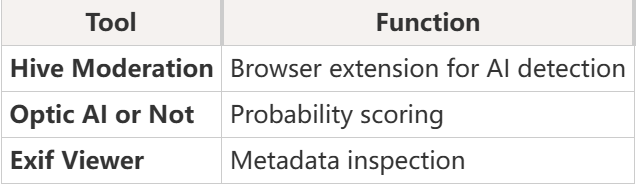
Detection Tools
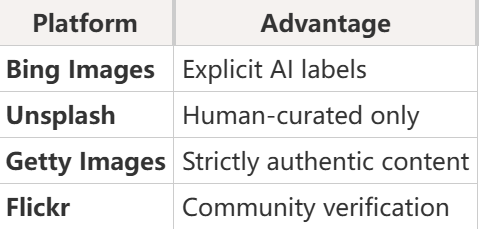
Alternative Platforms
Key Takeaway
No single solution exists. Combine search operators, filters, and verification tools. For guaranteed authenticity, use curated platforms like Unsplash and Getty Images.