
Simply put, Google AI Search gives you answers directly at the top of your search results, instead of just throwing a bunch of links at you like traditional search does.
For example, if you search "how to cook steak," traditional search gives you 10 webpage links and you have to click through them. AI Search tells you right at the top: "Let steak come to room temperature for 30 minutes, sear on high heat for 2-3 minutes per side, rest for 5 minutes..."
Current availability:
Fully rolled out in the US
Other regions need to enable "Search Labs" experimental features (instructions below)
Available on both mobile and desktop
How to Turn This Feature On?
If you're overseas (US, etc.)
Chances are it's already enabled automatically. Just type your question in the Google search box, and you'll see an AI-generated summary at the top, with traditional results below.
If you're in regions where it's not fully rolled out
You need to enable it manually:
Go to
labs.google.com/search
Sign in with your Google account
Find the "AI Overviews and more" option
Toggle it on (Enable)
Refresh your Google search page, and you should see AI summaries
Note: This feature rolls out gradually. If you can't find the option, it hasn't reached you yet—check back in a few weeks.
How to Use Google AI Search Effectively: Question Tips
AI Search isn't magic. How you ask directly impacts answer quality. Here are battle-tested tips:
1. Ask specific questions, not vague ones
❌ Bad example: "Tell me everything about Python"
✅ Good example: "What's the difference between Python list and tuple?"
Why: AI has limited context. The more specific your question, the more precise the answer.
2. Use natural language, not keyword stuffing
❌ Bad example: "Python list tuple difference"
✅ Good example: "What are the main differences between Python list and tuple, and when should I use each?"
Why: Google AI Search understands natural language. Complete sentences work better than keyword fragments.
3. Follow up and clarify
Here's what many people don't know—you can continue the conversation.
There's usually an "Ask a follow-up" button below the AI answer. For example:
First ask: "How to lose weight?"
After the AI answers, follow up: "What exercises are suitable for people with high blood pressure?"
The AI understands from context you're asking about "weight-loss exercises for hypertension patients"
4. Request specific formats
You can directly tell AI how you want the answer formatted:
"List the steps in bullet points"
"Give me a 3-day itinerary"
"Show pros and cons in a comparison table"
"Explain with code examples in Chinese/English"
AI Search vs Traditional Search: When to Use Which?
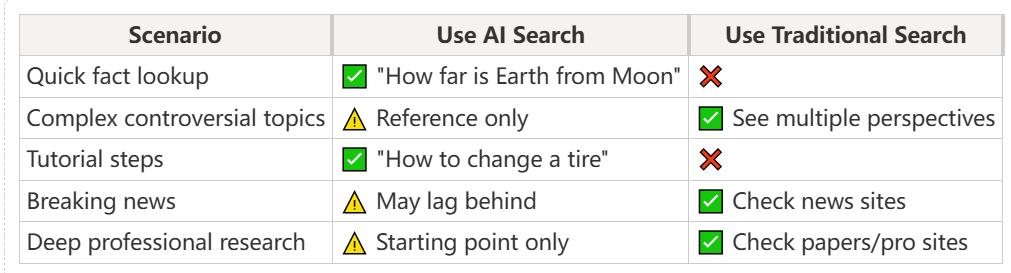
Key principle: AI Search excels at quick structured information retrieval; traditional search wins for deep research, multiple perspectives, and real-time updates.
Pitfalls to Avoid When Using Google AI Search
1. Don't believe everything—verify
AI Search's biggest weakness: it may confidently give you wrong information (academically called "hallucinations").
2. Timeliness issues
AI models have training cutoffs. For real-time info like "iPhone price announced yesterday," AI might not know or get it wrong. Traditional search results are more reliable here.
3. Copyrighted content
AI Search might summarize paywalled content, but you only see excerpts. For full content, you still need to visit the original website.
Advanced Tips: Getting More Out of Google AI Search
1. Let AI summarize webpages for you
Copy a link to a long article and ask: "Summarize the main points of this article"—AI will fetch and summarize, saving you reading time.
2. Mix languages in questions
You can ask about English content in Chinese, or vice versa. For example, ask in Chinese: "Explain blockchain in simple terms," and AI will answer in English.
3. Debug code
Paste an error message and ask: "What does this Python error mean and how do I fix it?" AI usually explains and suggests fixes.
4. Create learning plans
Ask: "I want to learn photography in 3 months, can study 5 hours per week, give me a learning roadmap"—AI generates a structured plan.
Final Thoughts on How to Use Google AI Search
Google AI Search isn't here to replace traditional search. It's to save you from opening 10 webpages and filtering information yourself. Treat it as a research assistant that summarizes quickly, not an all-knowing expert.
The smart way to use it: Start with AI Search for quick overview, click into credible sources to verify details, use traditional search for complex topics requiring multiple perspectives.
This feature is iterating rapidly. If you can't use it now, it may roll out fully in a few months. Bookmark this guide and come back to it when you're ready.Quick test: Go search "how to make sourdough bread" now. Compare what AI Search gives you versus the information you'd gather from clicking through 3 traditional webpages.